![[PukiWiki]](image/pukiwiki.png "[PukiWiki]")
#multilang(ja){{
このページはyoshimasa niwa - iPhoneでOpenCVを使う方法で紹介されている
OpenCV 2.1用のビルドスクリプトをOpenCV 2.2で使うための方法を記載しています.
公式サイトからOpenCV-2.2.0.tar.bz2をダウンロードします.
このページの「Downloads」ボタンを押して,
niw-iphone_opencv_test-4ab0572.zipをダウンロードします.
下記のパッチファイルをダウンロードします.
| Filename | Size | Date | Type | Download |
| opencv2.2_for_ios4.2_build_script_20101231.zip | 5.07kb | 20101231 | Zip |  |
このzipに格納されているファイルの内容は以下の通りです.
下記の3ファイルを展開します.
展開後,下記のフォルダを同一階層に配置します.
(1)OpenCV 2.2のディレクトリに移動
% cd OpenCV-2.2.0
(2)OpenCV 2.2にパッチを適用
% patch -p1 < ../opencv2.2_for_ios4.2_build_script_20101231/OpenCV-2.2.0.patch
(3)ビルドスクリプトのディレクトリに移動
% cd ../niw-iphone_opencv_test-4ab0572
(4)ビルドスクリプトにパッチを適用
% patch -p1 < ../opencv2.2_for_ios4.2_build_script_20101231/niw-iphone_opencv_test-4ab0572.patch
ここまででパッチの適用が完了です.
そして,niw-iphone_opencv_test-4ab0572にある
ディレクトリ中にあるinclude,lib,shareディレクトリを削除しておきます.
(※OpenCV 2.1用のライブラリとヘッダが格納されているため)
(1)ビルドスクリプトのディレクトリに移動
% cd ../niw-iphone_opencv_test-4ab0572
(2)ビルド用ディレクトリ(シミュレータ用)作成
% mkdir build_simulator
(3)ビルド用ディレクトリ(シミュレータ用)に移動
% cd build_simulator
(4)CMake実行
% ../opencv_cmake.sh Simulator ../../OpenCV-2.2.0
(5)ビルド
% make -j 4
(6)インストール
% make install
(1)ビルドスクリプトのディレクトリに移動
% cd ../niw-iphone_opencv_test-4ab0572
(2)ビルド用ディレクトリ(デバイス用)作成
% mkdir build_device
(3)ビルド用ディレクトリ(デバイス用)に移動
% cd build_device
(4)CMake実行
% ../opencv_cmake.sh Device ../../OpenCV-2.2.0
(5)ビルド
% make -j 4
(6)インストール
% make install
niw-iphone_opencv_test-4ab0572\OpenCVTest.xcodeprojを
Xcodeで開き,ビルドしてください.
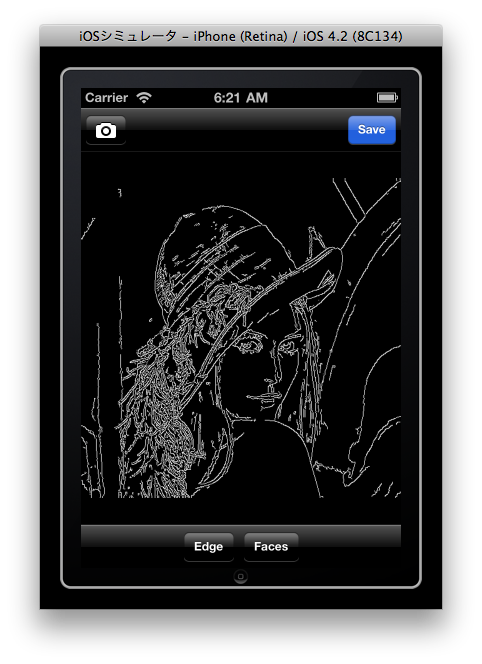 |
| エッジ検出のデモ |
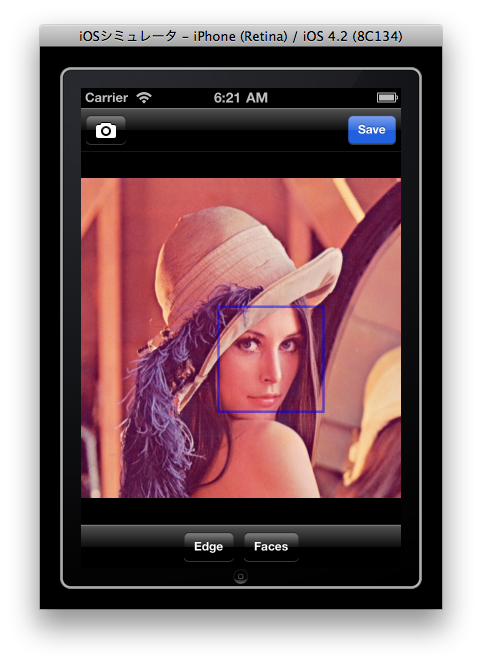 |
| 顔検出のデモ |
}}
#multilang(en){{
The page describes the method to use OpenCV 2.2 on iOS SDK 4.2.
And, this method use yoshimasa niwa - Using OpenCV on iPhone as a reference.
Please get "OpenCV-2.2.0.tar.bz2" from Official page.
Please get "niw-iphone_opencv_test-4ab0572.zip" from this page.
Please get the following patch file.
| Filename | Size | Date | Type | Download |
| opencv2.2_for_ios4.2_build_script_20101231.zip | 5.07kb | 20101231 | Zip | |
This Zip file contains the following patch file.
Please extract the following file.
After the extraction, please put the following directory to same hierarchy.
(1)Move to the OpenCV 2.2 directory
% cd OpenCV-2.2.0
(2)Apply the patch to OpenCV 2.2
% patch -p1 < ../opencv2.2_for_ios4.2_build_script_20101231/OpenCV-2.2.0.patch
(3)Move to the build script directory
% cd ../niw-iphone_opencv_test-4ab0572
(4)Apply the patch to the build script
% patch -p1 < ../opencv2.2_for_ios4.2_build_script_20101231/niw-iphone_opencv_test-4ab0572.patch
This will go through the applying the patch.
Please delete "include","lib","share" directory from the following directory.
(1)Move to the build script directory
% cd ../niw-iphone_opencv_test-4ab0572
(2)Create the build directory(for simulator)
% mkdir build_simulator
(3)Move to the build directory(for simulator)
% cd build_simulator
(4)Do the CMake
% ../opencv_cmake.sh Simulator ../../OpenCV-2.2.0
(5)Build
% make -j 4
(6)Install the library
% make install
(1)Move to the build script directory
% cd ../niw-iphone_opencv_test-4ab0572
(2)Create he build directory(for device)
% mkdir build_device
(3)Move to the build directory(for device)
% cd build_device
(4)Do the CMake
% ../opencv_cmake.sh Device ../../OpenCV-2.2.0
(5)Build
% make -j 4
(6)Install the library
% make install
Please open the niw-iphone_opencv_test-4ab0572\OpenCVTest.xcodeproj using Xcode.
|
| Sample of edge detection |
|
| Sample of face detection |
}}


